> For the complete documentation index, see [llms.txt](https://learn.squirrel365.io/llms.txt). Markdown versions of documentation pages are available by appending `.md` to page URLs; this page is available as [Markdown](https://learn.squirrel365.io/components-functions-and-connections/overview-2/other-1/sap-webi-connector.md).
# SAP Webi Connector
The article described the SAP Webi connector and all its properties
{% hint style="success" %}
**Who can use this feature?**
The **SAP Webi Connector** can be used by those with the **Builder** subscription plan.
For more details, see our [**pricing comparison matrix**](https://squirrel365.io/pricing/).
{% endhint %}
The **SAP Webi Connector** can is used to connect the Squirrel project to an external BusinessObjects database.
## SAP Webi Properties- Credentials
### AUTHENTICATION
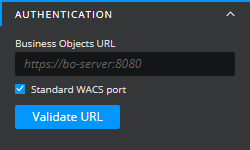
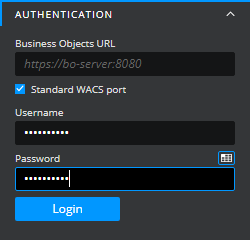
A BusinessObjects URL is required to use the **SAP Webi Connector**.
* **Standard WACS port** - this option can be checked to enable the standard port for the BusinessObjects URL. When unchecked, a field will populate where a specific port can be defined.
* For more information on WACS ports, [**see here**](https://help.sap.com/docs/SAP_BUSINESSOBJECTS_BUSINESS_INTELLIGENCE_PLATFORM/2e167338c1b24da9b2a94e68efd79c42/4698c7096e041014910aba7db0e91070.html)
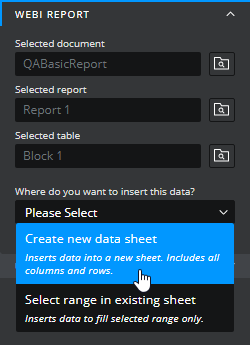
### WEBI REPORT
Once logged into and connected to the SAP environment, the properties panel will populate a WEBI REPORT drawer
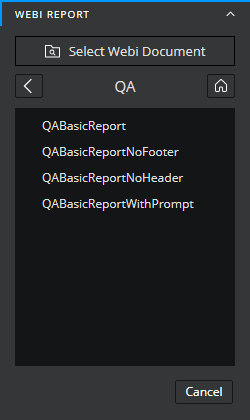
Click to expand this drawer and click "Select Webi Document"
A list of all known documents in the connected environment will populate below. Navigate through and select the desired report to bring through to Squirrel.
After a document has been selected, follow the steps to select a report and table.
Finally, an option will appear to select how the data will populate in the spreadsheet.
* **Create new data sheet** - creates a datasheet in the spreadsheet that will bringi nthe data.
{% hint style="warning" %}
Datasheets cannot be edited, only referenced in cell bindings and formulas in other sheets.
{% endhint %}
* **Select range in existing sheet**
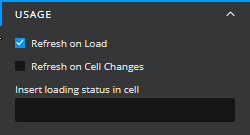
### USAGE
* **Refresh on Load** - Causes the data to populate and refresh in the spreadsheet on load of the project
* **Refresh on Cell Changes** - causes the data to populate and refresh in the spreadsheet on the change of a designated cell
* **Insert loading status in cell** - inserts the status of the loading Webi Report in the spreadsheet. Can be used to track the initiation, progress, and completion, or failure.